> For the complete documentation index, see [llms.txt](https://docs.rpay.inc/llms.txt). Markdown versions of documentation pages are available by appending `.md` to page URLs; this page is available as [Markdown](https://docs.rpay.inc/plug-ins-and-sdks/javascript-js.md).
# Javascript(JS)
## 🚀 Rocketfuel SDK Overview
The Rocketfuel SDK simplifies the integration of **age verification** and **payment (PayIn)** features into your web and mobile applications. It provides both **server-side** and **client-side** SDKs, ensuring secure and seamless integration across environments.
### Pre-Requisites
1. Setup your rocketfuel Account
2. Generate clientId, clientSecret and whitelist your domain
3. For ZKP
1. Download CryptoX app from Goole play / ios app store
2. OR download chrome extension
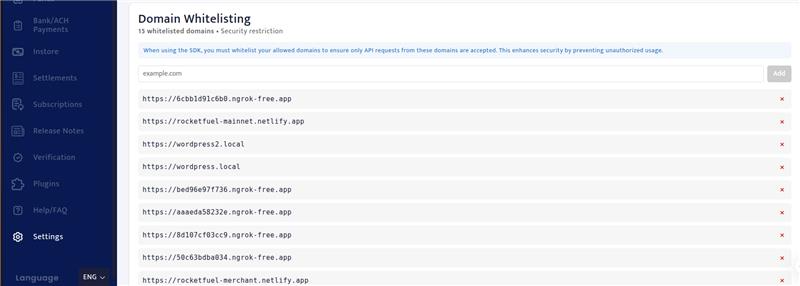
## Domain Whitelisting
Domain whitelisting ensures that your SDK can only be accessed from approved domains. This helps protect your merchant account from unauthorized usage.
### Steps to Whitelist a Domain
1. **Login to your Merchant Portal**
2. **Navigate to Domain Whitelisting**\
Go to: `Settings > Domain Whitelisting`
3. **Add Your Domain**
* Enter the URL of the domain where you will be using the SDK.
* Supported URL formats:
* [http://example.com](http://example.com/)
* [https://example.com](https://example.com/)
* [http://localhost:3000](http://localhost:3000/) (for local development)
**Note:** Do not include trailing slashes (`/`) in your URLs.
4. **Save Changes**\
Click on the **Save** or **Add** button to whitelist the domain.
5. **Verify**\
Once added, your domain should appear in the list of approved domains. Only requests originating from these domains will be allowed to use the SDK.
{% hint style="info" %}
**Important Notes:**
* Only URLs from whitelisted domains can load the SDK.
* Subdomains must be added explicitly if required, e.g., [https://app.example.com](https://app.example.com/).
{% endhint %}
#### 📚 Documentation
* **Server SDK (Node.js)**\
Use the server SDK for secure operations, including order creation, token management, and backend verification.\
👉 [Rocketfuel Server SDK (Node.js)](https://docs.rpay.inc/plug-ins-and-sdks/javascript-js/rocketfuel-sdk-nodejs?utm_source=chatgpt.com)
* **Client SDK (JavaScript)**\
Use the client SDK to embed age verification widgets and payment buttons into your website or app.\
👉 [Rocketfuel Client SDK](https://docs.rpay.inc/plug-ins-and-sdks/javascript-js/rocketfuel-sdk-client?utm_source=chatgpt.com)
#### 🔑 Key Features
* **Age Verification (`AGE_VERIFICATION`)**: Ensure compliance by verifying user age before restricted actions.
* **Payment Collection (`PAYIN`)**: Collect payments securely using BTC, ETH and other supported currencies.
* **Modular integration**: Use via CDN, npm package, or with popular frameworks (React, Vue, Angular).
## Wallets That Can Be Used for Age Verification
Use **production (mainnet)** wallets with the Rocketfuel SDK.
{% hint style="warning" %}
Connect a production/mainnet wallet. Testnet wallets will not work in production.
{% endhint %}
### 1. Android
Production (Mainnet App): [Download Android Production App](https://play.google.com/store/apps/details?id=com.pioneeringtechventures.wallet\&hl=en_IN)
### 2. iOS
Production (Mainnet App - App Store): [Download iOS Production App](https://apps.apple.com/sg/app/cryptox-concordium-wallet/id1593386457)
### 3. Browser Wallet Chrome Extension
[Download Chrome Wallet Extension](https://chromewebstore.google.com/detail/concordium-wallet/mnnkpffndmickbiakofclnpoiajlegmg?hl=en)
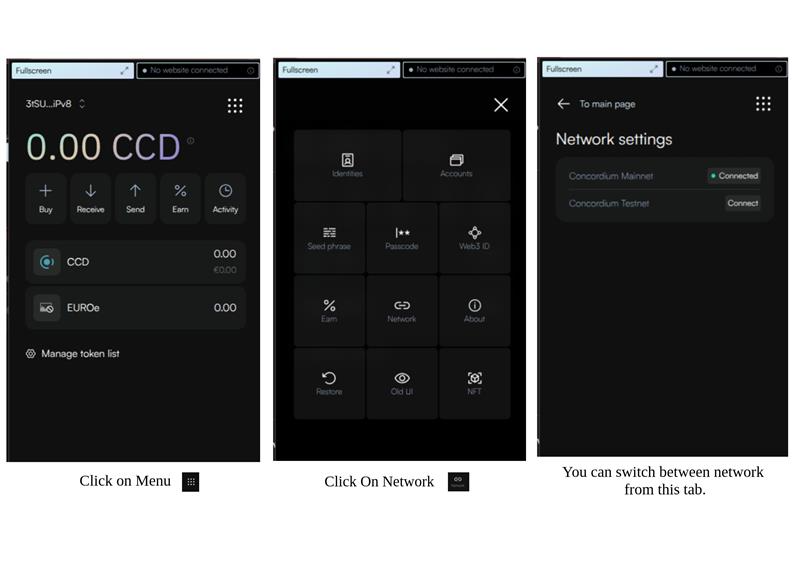
**Switching Network in Browser Wallet**
* Open the wallet extension in your browser.
* Click on the Network dropdown (usually at the top).
* Select **Mainnet** for production.